When writing a report or research paper, it is essential to find and read previous studies, (i.e., academic papers) related to your topic.
・Explore existing research and understand current trends in the field
・Identify existing research to avoid duplication and ensure originality
・Find evidence and data to support or challenge your hypothesis
Searching the literature helps you find useful information and ideas for your research.
Academic papers are often published in scholarly journals or as chapters in academic books.
Depending on the research field, sources may include not only academic papers but also articles from magazines and newspapers.
Search by Keyword (Using Academic Databases)
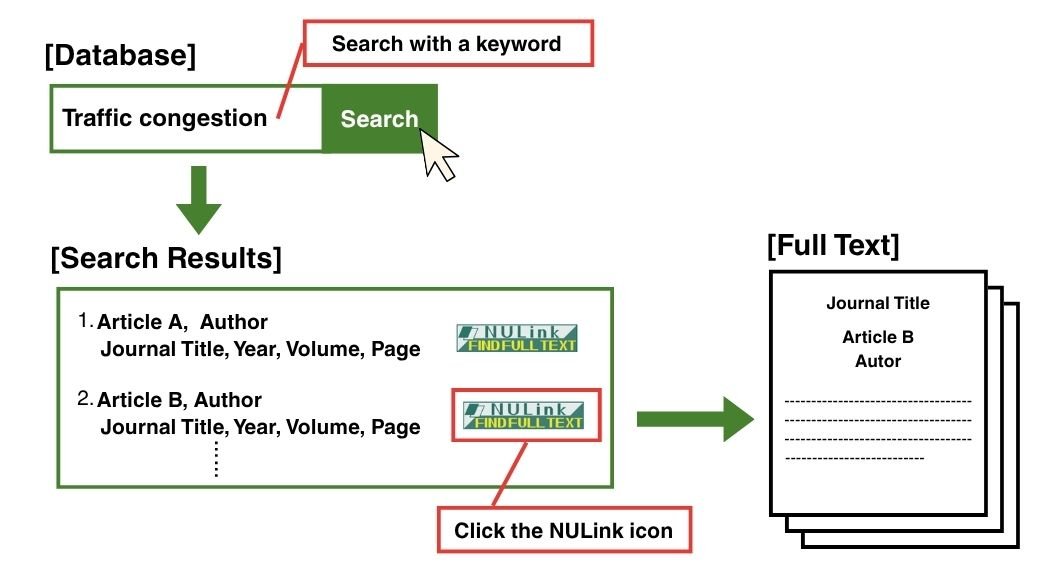
Using academic databases, you can find articles related to your research topic by searching keywords. Databases also provide bibliographic information, including article titles, authors, journal titles, volume and issue numbers, page numbers, publication years, and abstracts.
Nagoya University provides access to a wide range of academic databases.
Major Academic Databases
To search for academic papers across a wide range of fields, consider using the following databases:
Note: Web OYA-bunko and Zassaku Plus are available only on campus.
For additional subject-specific databases, please refer to the database list.
Accessing Full Text
Click the NULink icon in the database search results to check access to the full text. With one click, you can see whether the article is available online or whether the journal is available in Nagoya University library.
If the database does not support NULink, or if you already know which article you want to read, please check the "Find a Specific Article" section.
Search Using Reference Lists (Citation Chaining)
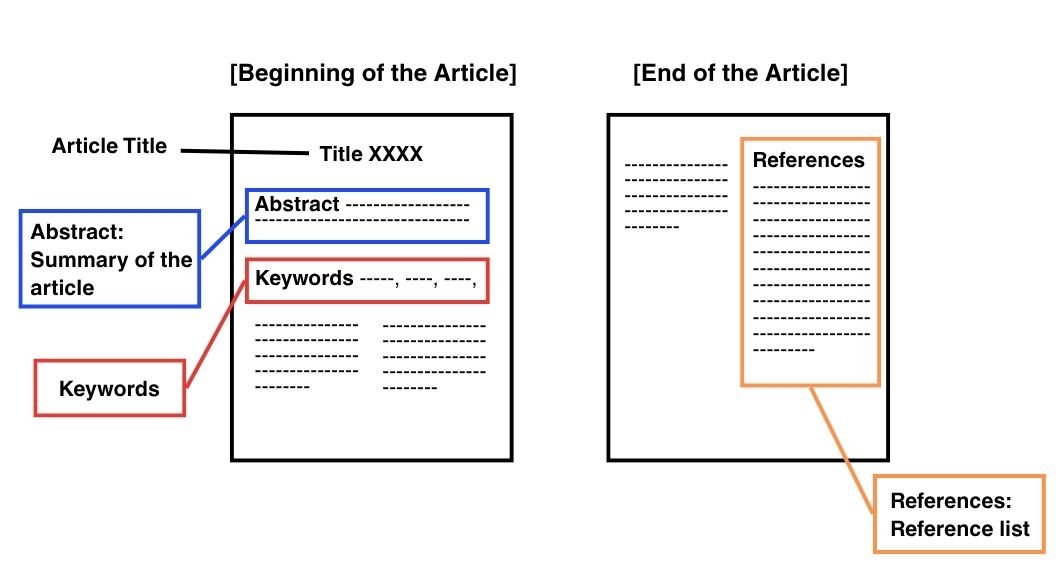
Most academic papers include a reference list at the end. The references are closely related to the paper's topic. By reading the cited articles and then checking the reference lists in those articles, you can discover more relevant papers to read.
Browse Library Shelves and Tables of Contents (Browsing)
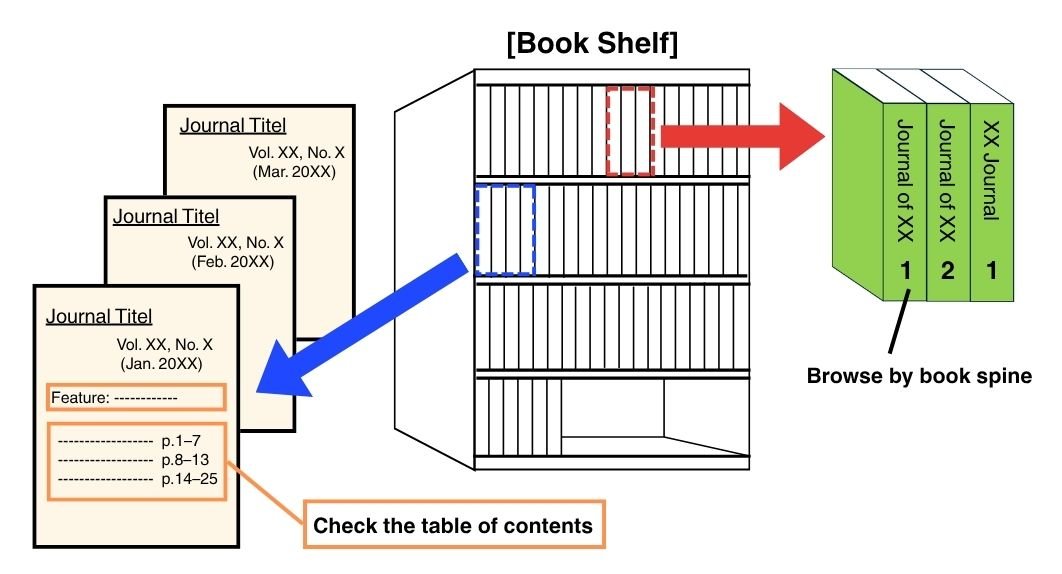
This method involves browsing books and journals on library or bookstore shelves and checking journal tables of contents. Regularly reviewing specific journals, such as academic society journals, can help you discover relevant articles.
Search Using Print Bibliographies
In addition to online databases, some bibliographies are available in printed form. You can search them using indexes such as subject, keywords, and author names. If there is a bibliography related to your topic, take a look through it to find relevant references.
For Example:
・
Regularly published abstract journals include titles such as Chemical Abstracts, Forestry Abstracts, and Higher Education Abstracts. Some are available in print format, while others are now accessible as online databases.
・
Subject- or topic-specific bibliographies include Catalogue of Books on Asia and Africa, Abstracts and Bibliography on Social Education, and others. Books that compile references may have titles such as "Bibliography," "Literature Abstracts," "Basic Book List," or "Guide to Literature."
Narrow or Broaden Your Search
Refining Your Keywords
When a database search does not return relevant articles, reconsider your keywords.
A large number of unrelated results may indicate that your keywords are too broad. In this case, use more specific or focused keywords. Reviewing the keywords used in relevant articles can help you identify effective search terms.
A limited number of results may indicate that your keywords are too narrow. Try using broader terms or reducing the number of keywords.
Authors may also use different terms to describe the same concept. Consider possible variations in wording and try searching with synonyms and related terms.
Example: To search for "Issues in Nanotechnology"
・Nanotechnology: nanotech, nanoscience, etc.
・Issues: challenges, problems, current situation, etc.
Reviewing Search Results
Once you find articles related to your topic, review the search results and consider the following:
・
When were articles on the topic published, and when were they most common?
・
Which authors have published many articles on the topic?
・
Which journals have published many articles on the topic?
・
What words often appear in article titles?
By examining these aspects, you can understand research trends in the field.
You can use author names or journal titles to find additional articles that may not be found through keyword searches. You can also use newly discovered terms as keywords to expand your search.
Find a Specific Article
If you have identified an article you want to read through a database search or a reference list, search for the journal in which the article was published.
Reading Electronic Journals
Electronic journals allow you to read journal articles online, often in PDF format. Nagoya University provides access to a lot of journal titles.




 in the database search results to check access to the full text. With one click, you can see whether the article is available online or whether the journal is available in Nagoya University library.